
10 Best IPTV Apps USA (2026): The Ultimate Guide to Seamless Streaming
The streaming landscape in the United States has shifted. While hardware used to be the primary focus, 2026 is the year of the software player. Finding the best IPTV apps USA isn’t just about getting access to channels; it’s about the user interface, EPG (Electronic Program Guide) stability, and the ability to handle 4K streams without crashing.
Whether you are using a Firestick, an Android box, or a Smart TV, the application you choose acts as the “engine” for your content. In this comprehensive guide, we break down the top-tier applications available to American viewers this year.
Why the Right IPTV App Matters
Many users invest in a high-quality best IPTV subscription USA 2025 only to find their experience marred by a laggy interface. The app is the bridge between your provider’s server and your screen. A top-tier app provides:
-
Fast Channel Zapping: No one likes waiting 5 seconds for a channel to load.
-
EPG Integration: A clean TV guide to see what’s playing next.
-
Recording (PVR): The ability to save live sports or shows for later.
-
Multi-Screen Support: Watching two games at once.
Top 10 Best IPTV Apps for USA Users in 2026
1. TiviMate IPTV Player
SUBSCRIBE NOW
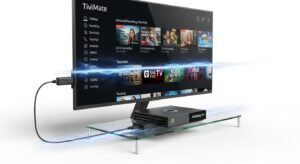
TiviMate remains the undisputed king for Android-based devices. It offers a premium, cable-like interface that is highly customizable. If you are looking for a professional feel, this is it.
-
Best For: Firestick, Nvidia Shield, and Android TV.
-
Key Feature: Scheduled recordings and multiple playlist support.
-
Setup Help: Check out our TiviMate IPTV USA guide for a step-by-step walkthrough.
2. IPTV Smarters Pro
Likely the most famous app globally, IPTV Smarters Pro is versatile. It works on almost everything, including iOS and Windows.
-
Best For: Mobile users and multi-device households.
-
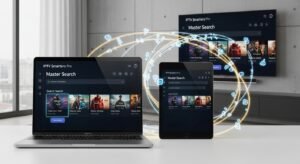
Key Feature: “Master Search” which allows you to find movies, series, and channels across all your playlists.
-
Internal Link: Learn how to optimize your experience with our IPTV Smarters Pro USA setup guide.
SUBSCRIBE NOW
3. OTT Navigator
If TiviMate is the “Premium Choice,” OTT Navigator is the “Power User’s Choice.” It is incredibly lightweight and works well on older hardware where other apps might lag.
-
Key Feature: Automatic grouping of channels based on genres.
4. XCIPTV Player
Many providers offer a branded version of XCIPTV because it is so reliable. It features a built-in media player, so you don’t have to install external apps like VLC or MX Player.
-
Best For: Beginners who want a “plug and play” experience.
5. Perfect Player IPTV
Perfect Player is known for its “Full-Screen” EPG and very low resource consumption. It mimics the look of traditional satellite receivers.
Performance Optimization: Fix Lag and Buffering
SUBSCRIBE NOW
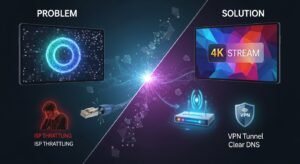
Even the best IPTV apps USA can’t save you from a poor connection or ISP throttling. If you find your app is freezing, it might not be the app’s fault. Common issues usually stem from local network bottlenecks.
To ensure your stream stays in 4K, refer to our IPTV buffering fix USA tutorial. Additionally, if your app fails to connect entirely, our guide on IPTV not working USA fix covers the most common troubleshooting steps, including DNS changes and VPN usage.
Device Compatibility: Choosing the Right App for Your Hardware
IPTV Apps for Firestick
The Amazon Firestick is the most popular streaming device in America. Because it runs on FireOS (a version of Android), you have access to the most robust apps. For the smoothest experience, we recommend using the best IPTV for Firestick USA-optimized players.
IPTV Apps for Smart TVs (Samsung & LG)
Unlike Android-based devices, Samsung (Tizen) and LG (WebOS) have limited app stores. You won’t find TiviMate here. Instead, look for:
-
Nanomid
-
Smart IPTV (SIPTV)
-
IBO Player
For a deeper dive into these platforms, see our IPTV for Smart TV USA guide.
IPTV Apps for Roku
Roku is notoriously difficult for IPTV because it is a “closed” ecosystem. You cannot easily sideload apps. However, there are workarounds using screen mirroring or specific “hidden” apps. Consult our IPTV article for Roku USA to see the current 2026 methods.
Is Using These Apps Legal in the USA?
This is the most common question we receive. The apps themselves (like TiviMate or Smarters) are 100% legal; they are simply media players. The legality depends entirely on the content source you plug into them.
To stay informed about American streaming laws, we highly recommend reading our detailed breakdown: Is IPTV legal in the United States?.
Comparing Premium vs. Free IPTV Apps
| Feature | Free Apps | Premium Apps (Paid Versions) |
| Ads | Often present | Ad-free experience |
| EPG | Basic/Manual | Auto-refreshing & Detailed |
| Multi-Playlist | Usually 1 only | Unlimited |
| Customer Support | None | Frequent Updates |
While you can find a cheap IPTV USA service, pairing it with a “Pro” version of an app usually costs a one-time fee of $5–$20 and significantly improves your quality of life.
Regional Performance: From California to Florida
Does your location within the USA matter? Yes. Routing and server proximity play a role in how these apps perform.
-
West Coast: Users often see better performance with apps that allow for manual buffer size adjustments. See our IPTV California insights.
-
The South: For users in Texas or Florida, local ISP peering can affect speed. Check our IPTV Texas 2026 guide or the IPTV Florida 2026 guide for localized tips.
Expert Tips for the Best IPTV Experience in 2026
-
Use an External Player: While apps like Smarters have built-in players, using VLC or MX Player as your external video engine can often solve codec issues (e.g., video but no audio).
-
Hardwire Your Connection: If possible, use an Ethernet adapter for your Firestick or TV. Wi-Fi interference is the #1 cause of “app failure.”
-
Regularly Clear Cache: IPTV apps store a lot of data for the TV guide. Go into your device settings once a week and clear the cache to keep things snappy.
-
Try Before You Buy: Many services offer a iptv free trial usa guide so you can test how the app handles their specific server load.
Conclusion: Which App Should You Pick?
If you want the best possible experience in 2026, TiviMate is the winner for Android/Firestick users. If you need something that works across your phone, tablet, and TV, IPTV Smarters Pro is the most reliable “all-rounder.”
Choosing the right player is the final step in your cord-cutting journey. Once you have your app set up, make sure your provider is up to the task by checking out the best IPTV service USA the 2026 buyers guide.
TiviMate IPTV USA Guide 2026: Setup, Best Providers & Pro Tips