
IPTV Not Working USA: The 2026 Advanced Diagnostic & Infrastructure Recovery Guide
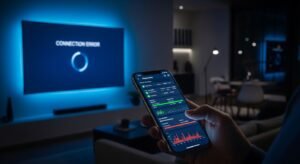
If your IPTV is not working in the USA today, you aren’t just dealing with a “bad link.” You are navigating a complex ecosystem of ISP deep-packet inspection (DPI), regional CDN congestion, and evolving middleware authentication protocols. In 2026, the “restart your router” advice of the past is insufficient for the sophisticated architecture of modern streaming.
SUBSCRIBE NOW
This guide moves beyond generic surface-level fixes. We will dissect the technical layers of the IPTV stack to identify exactly where your signal is dropping—whether it’s at the transport layer, the DNS resolution stage, or a server-side concurrency conflict.
The Anatomy of a Failed Stream: Why IPTV Drops in the USA
In the United States, IPTV failure typically originates from one of four primary friction points. Identifying which one you are facing is the difference between a 30-second fix and hours of wasted frustration.
- ISP-Level Interference: Major US providers (Comcast, AT&T, Spectrum) utilize automated systems to flag and throttle high-bandwidth UDP traffic patterns characteristic of IPTV.
- DNS Redirection/Filtering: Many IPTV outages are actually “silent blocks” where your ISP’s DNS refuses to resolve the provider’s server URL.
- Middleware & API Conflicts: Errors like “Code 401” or “Authorization Failed” often stem from Xtream Codes API mismatches or expired tokens in apps like TiviMate.
- Hardware Resource Exhaustion: Inexpensive Android boxes or older Firesticks often suffer from “cache bloat,” where the device lacks the RAM to buffer 4K streams.
Phase 1: The “Immediate Impact” Diagnostic (0-5 Minutes)
Before diving into registry edits or VPN configurations, execute these three high-signal tests. These are designed to isolate the problem to your network, your device, or your provider.
1. The Cellular Hotspot Bypass
Disconnect your streaming device from your home Wi-Fi and connect it to your smartphone’s 5G/LTE hotspot.
If it works: Your ISP is blocking the service or your router firewall is too aggressive.
If it fails: The issue is either your IPTV provider’s server or the app on your device.
2. The Web Player Verification
Most premium IPTV subscriptions in the USA provide a web-based player URL. Try logging in via a browser on a laptop.
Insight: If the web player works but your Firestick doesn’t, you have an app-specific configuration error (likely a corrupted EPG or player engine conflict).
3. M3U Link Validation
Paste your M3U URL into a tool like VLC Media Player on a PC. If VLC throws an “Unable to open MRU” error, the server is physically down or your account has been flagged for “Too Many Connections.”
Phase 2: Advanced Technical Troubleshooting
Solving ISP Throttling and DNS Hijacking
SUBSCRIBE NOW
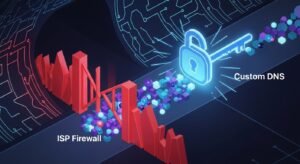
In 2026, US ISPs have become surgical with their throttling. They don’t slow down your whole internet; they target the specific ports used by IPTV (often Port 80, 8080, or 8880).
The Fix: Custom DNS Implementation
Avoid using your ISP’s default DNS. Manually set your router or device to use one of the following high-performance, unfiltered resolvers:
| Provider | Primary DNS | Secondary DNS |
|---|---|---|
| Cloudflare | 1.1.1.1 | 1.0.0.1 |
| 8.8.8.8 | 8.8.4.4 | |
| Quad9 | 9.9.9.9 | 149.112.112.112 |
Correcting “Buffering But Not Down” Scenarios
If your IPTV loads but buffers every 10 seconds, you are likely dealing with MTU (Maximum Transmission Unit) mismatch or CDN Latency. For users seeking a stable experience, checking an IPTV buffering fix guide specifically for the USA is essential, as routing paths to European or Middle Eastern servers can be highly unstable from North America.
Phase 3: App-Specific Resolution Strategies
IPTV Smarters Pro & TiviMate Errors
If you are using IPTV Smarters Pro, the most common reason for it not working is a “Data Processing Error.” This usually happens when the EPG (Electronic Program Guide) is too large for the device memory.
- Clear App Cache: Go to Settings > Apps > IPTV Smarters > Clear Cache (Never “Clear Data” unless you want to re-enter credentials).
- Switch Output Format: Change from .ts to .m3u8 in the app settings. .m3u8 is more resilient to packet loss.
- Update XC API: Ensure your “Server URL” doesn’t have a trailing slash (e.g., http://provider.com:8080 is correct; http://provider.com:8080/ will fail).
Firestick & Android TV Optimization
The Amazon Firestick is the most popular IPTV device in the USA, but its aggressive background processes can kill streaming performance.
Pro Tip: Disable “Collect App Usage Data” and “Interest-based Ads” in the Firestick Privacy settings. This frees up CPU cycles for video decoding.
What Most People Overlook: The “Concurrency Kill”
One of the most frequent reasons an IPTV service stops working in the USA is account concurrency violations. If you bought a “1 Device” plan and accidentally left the app running in the bedroom while trying to watch in the living room, the server will automatically “soft-ban” your IP for 30 to 60 minutes.
Expert Warning: Many modern IPTV servers now track “User-Agent” strings. If you switch from a Firestick to a VLC player on a PC frequently, the server may flag this as “Account Sharing” and suspend the stream.
How to Make the Final Decision: Fix or Switch?

SUBSCRIBE NOW
If you have followed the steps above and your IPTV is still not working, use this weighted evaluation framework to decide if it’s time to find a reliable IPTV provider or continue troubleshooting.
| Factor | Indicator to STAY | Indicator to SWITCH |
|---|---|---|
| Downtime Frequency | Once per month (Maintenance) | Every weekend (Prime Time) |
| Support Response | Under 4 hours (Telegram/Ticket) | No response / Dead links |
| VPN Necessity | Works without VPN occasionally | Throttled 100% of the time |
| Channel Integrity | 95% of channels active | “Looping” or “Audio Sync” issues |
If you fall into the “Switch” category, it is vital to research the best IPTV service for the USA to ensure you are moving to a provider with a redundant CDN architecture and localized US servers.
Infrastructure Check: Is Your Hardware the Bottleneck?
Sometimes the service is fine, but the hardware is failing. In 2026, 4K HDR streams require a consistent 25-50 Mbps of uninterrupted throughput. If you are using IPTV on a Smart TV, be aware that most TV processors are significantly weaker than dedicated streaming sticks.
The “Real-World” Hardware Checklist:
- Are you using a Cat6 Ethernet cable? (Wi-Fi interference in US apartment complexes is a primary cause of IPTV failure).
- Is your Firestick powered by the wall outlet? (USB ports on TVs often under-volt the device, causing Wi-Fi chip instability).
- Have you checked for a free trial on a different service to see if the hardware performs better?
Summary of Recovery Steps
To summarize, if your IPTV is not working in the USA, follow this logic flow:
1. Isolate: Use a Mobile Hotspot to rule out ISP blocking.
2. Refresh: Clear app cache and reboot the router.
3. Re-authenticate: Check for expired subscription pro credentials or URL changes.
4. Optimize: Change DNS to 1.1.1.1 and use a VPN if throttling is confirmed.
Frequently Asked Questions
Why does my IPTV work on my phone but not my TV?
This is usually due to network routing or hardware limitations. Phones often use different DNS settings and have much more powerful processors for decoding video. Additionally, if your phone is on 5G and your TV is on Wi-Fi, the TV may be suffering from local interference. Try hardwiring your TV via Ethernet or updating the app on your TV.
Is it legal to fix my IPTV if it’s blocked by my ISP?
The legality depends on the source of your content. While using a VPN or custom DNS is perfectly legal in the USA for privacy, we always recommend consulting a legal IPTV guide to ensure your provider complies with DMCA and local regulations. Using a legal IPTV provider significantly reduces the risk of ISP-level blocks.
What is the “Code 403 Forbidden” error?
A 403 error means the server understands your request but refuses to authorize it. In the USA, this typically happens if you are using a VPN server that the IPTV provider has blacklisted, or if your account has been suspended for violating the “single-connection” rule. Try disabling your VPN or contacting your provider to reset your IP lock.
Does a VPN always fix IPTV buffering in the USA?
No. While a VPN can stop ISP throttling, it also adds an extra “hop” to your connection, which can increase latency. If your IPTV is not working because the source server is overloaded, a VPN will actually make the buffering worse. Only use a VPN if you have confirmed that your ISP is the specific bottleneck.
How do I know if my IPTV provider has shut down?
Check their official Telegram channel or support portal. If the website is down and your M3U link returns a “404 Not Found” or “Connection Refused” even on a mobile hotspot, the provider may have ceased operations. In this case, it’s best to look for top-rated IPTV alternatives in the USA.
Can my router’s firewall block IPTV?
Yes. Some modern US routers have “CyberSec” or “HomeShield” features that flag IPTV traffic as “Unsolicited UDP.” To fix this, look for “SIP ALG” in your router settings and disable it, as this protocol often interferes with the way IPTV streams are initiated.