
What is IPTV Service? The Ultimate Guide to Modern TV
Television has changed. Gone are the days when you had to wait for a specific time to watch your favorite show or deal with messy cables running across your roof. The world is moving online, and television is following suit. You have likely heard the term “IPTV” thrown around in tech circles or by friends who have “cut the cord.” But what does it actually mean?
SUBSCRIBE NOW
If you are looking for a clear explanation without confusing jargon, you are in the right place. This guide will explain what is IPTV service, how it functions, and why millions of people are choosing it over traditional cable.
Understanding the Basics: What is IPTV Service?
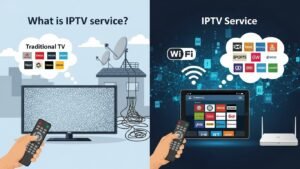
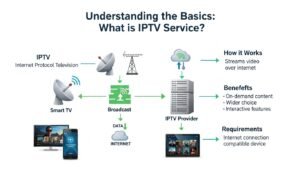
IPTV stands for Internet Protocol Television. While the name sounds technical, the concept is quite simple. Instead of receiving TV signals through an antenna on your roof, a satellite dish, or a fiber-optic cable, you receive them through your internet connection.
SUBSCRIBE NOW
Think of it this way: traditional TV pushes content to you. You have to watch what is being broadcasted at that exact moment. You cannot pause it, rewind it, or choose a different show if nothing good is on.
IPTV is different. It uses the same technology that powers the internet to send videos to your device. It allows you to select what you want to watch. In many ways, it brings the experience of browsing a website to your television screen.
The Shift from Cable to Internet
We are currently witnessing a massive shift in how media is consumed. Just as email replaced physical letters, IPTV is slowly replacing traditional broadcasting. This isn’t just a trend; it is the evolution of entertainment.
How Does IPTV Work? (Simplified)
You do not need a degree in computer science to understand how IPTV works. We can break it down into a simple process. When you watch a standard TV show, your TV receives radio waves and converts them into pictures. IPTV does something different.
Here is the step-by-step process of how an IPTV service delivers content to your screen:
- Content Storage: TV programs and movies are stored on large digital servers.
- Encoding: The video files are compressed and converted into digital packets. This makes them small enough to travel through the internet.
- Transmission: When you click “play,” the server sends these packets to your IP address (your internet location).
- Decoding: Your device (TV, phone, or box) receives the packets and reassembles them into video.
- Playback: You see the image on your screen instantly.
The Three Main Types of IPTV Services
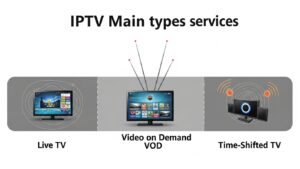
When asking what is IPTV service, it is important to know that it is not just one single thing. IPTV generally comes in three different formats. You likely use at least one of them already without realizing it.
SUBSCRIBE NOW
1. Video on Demand (VOD)
This is the most common form of IPTV. Video on Demand allows you to select a movie or TV show from a library and watch it whenever you like. There is no schedule. You are in complete control.
Examples: Netflix, Disney+, Amazon Prime Video, and Hulu.
2. Time-Shifted TV
Have you ever missed the start of a show and used a “Catch-up” feature to watch it later? That is Time-Shifted TV. It allows you to replay broadcasts that aired hours or days ago. However, unlike VOD, these shows are only available for a limited time.
Examples: BBC iPlayer, FOX Catch-up, and various network apps.
3. Live IPTV (Simulcasting)
This format mimics traditional TV the most. You watch live broadcasts as they happen. This is popular for live sports events, news, and award shows. You are streaming the content over the internet, but you are watching it live with the rest of the world.
Examples: Sling TV, YouTube TV, and live sports streams.
IPTV vs. Traditional TV: A Comparison
Why are people switching? To understand the hype, we need to compare IPTV directly against the old-school methods of Satellite and Cable. The differences are stark.
| Feature | Traditional TV (Cable/Satellite) | IPTV Service |
|---|---|---|
| Transmission | Analog signals via cables or dishes | Digital data via the Internet |
| Schedule | Fixed schedule (Appointment viewing) | On-demand and Live options |
| Device Compatibility | Requires a specific TV set and box | TVs, Phones, Tablets, Laptops |
| Geographic Limit | Locked to your specific region | Accessible anywhere with internet |
| Cost | Expensive, long-term contracts | Generally cheaper, monthly subscriptions |
What Devices Do You Need?
One of the biggest advantages of IPTV is that it is hardware-agnostic. This means you do not need to buy a specific brand of television to make it work. However, you do need a device that can connect to the internet and decode the video.
Here are the most common devices used to run IPTV services:
- Smart TVs: Most modern TVs from Samsung, LG, or Sony come with IPTV apps pre-installed or available in their app stores.
- Streaming Devices: Devices like the Amazon Fire TV Stick, Roku, or Google Chromecast are very popular. They turn any old TV into a smart IPTV receiver.
- Android Boxes: Dedicated boxes like the NVIDIA Shield or MAG boxes are powerful options for serious users who want high-speed performance.
- Computers and Consoles: You can watch IPTV directly on your laptop or gaming consoles like Xbox and PlayStation.
- Mobile Devices: Smartphones and tablets allow you to take your TV anywhere you go.
The Benefits: Why Use IPTV?
People are not just switching technologies for fun; they are switching because the benefits are tangible. Here is why the IPTV market is growing so fast.
1. Cost Efficiency
Traditional cable bills are notorious for hidden fees and expensive packages. IPTV services usually operate on a monthly subscription basis that is significantly cheaper. You pay for what you use, and you can often cancel at any time.
2. Flexibility and Mobility
With a cable subscription, your TV is stuck in your living room. With IPTV, your TV is in your pocket. You can watch your favorite sports team while on the bus, or catch up on news while waiting at the dentist. As long as you have WiFi or data, you have TV.
3. Content Variety
Cable packages limit you to local channels and a few premium options. IPTV opens up global content. You can easily find services that offer channels from different countries, making it excellent for expats or language learners.
The Downsides: What to Watch Out For
To keep this article honest and realistic, we must discuss the disadvantages. IPTV is great, but it is not perfect.
- Buffering: If your internet drops or becomes slow, your TV show will stop. This is the “buffering” wheel of death. A stable connection is mandatory.
- Latency: Live sports on IPTV can sometimes be delayed by 30 to 60 seconds compared to real-time. You might hear your neighbors cheering for a goal before you see it on your screen.
- Technical Setup: While services like Netflix are easy, setting up a dedicated live IPTV subscription can sometimes require a bit of technical know-how.
Is IPTV Legal? The Gray Area
This is the most common question users ask: “Is this actually legal?” The answer depends entirely on which service you use. We need to distinguish between two types of services.
Verified IPTV Services
These are services that are available on official app stores like Google Play or the Amazon App Store. They have bought the legal rights to broadcast the content. They are 100% legal and safe to use.
Examples: Hulu Live TV, Sling TV, YouTube TV, Pluto TV.
Unverified IPTV Services
These services are often found on third-party websites. They offer thousands of channels for a very low price. In many cases, these providers do not own the rights to the content they are selling. Streaming copyrighted content without permission is illegal in many countries.
How to Choose the Right Service
With thousands of providers available, selecting the right one can be overwhelming. Do not just pick the first one you find on Google. Here is a checklist to help you make a smart decision.

SUBSCRIBE NOW
1. Check Device Compatibility
Ensure the service has an app that works on your specific device. If you have an Apple TV, make sure the provider supports iOS.
2. Channel Selection
Does the service actually have the channels you watch? If you are a sports fan, look for specific sports packages. If you love movies, check their VOD library.
3. Trial Periods
Reputable IPTV providers usually offer a trial period (24 to 48 hours). Never sign up for a long-term subscription without testing the service first to check for buffering and stability.
4. Customer Support
Things will go wrong eventually. You want a provider that offers customer support via email or chat to help you fix connection issues.
Setting Up Your First Stream
Ready to try it out? While every service is different, the general setup process usually looks like this:
- Get a High-Speed Internet Connection: Ensure your router is placed centrally in your home.
- Choose a Device: Use your Smart TV, or plug in a Firestick/Roku.
- Download an IPTV Player: Popular apps include IPTV Smarters, TiviMate, or VLC Player.
- Subscribe: Sign up with a provider and get your login details.
- Connect: Enter your username, password, and the server URL provided by the service into the app.
- Enjoy: Browse the channel list and start watching.
The Future of Television
The writing is on the wall for traditional broadcasting. Cable companies are losing millions of subscribers every year in a phenomenon known as “cord-cutting.”
The future of TV is app-based. It is personalized, data-driven, and internet-reliant. As internet speeds increase globally with the rollout of 5G and fiber optics, the quality of IPTV will only get better. We are moving toward a world where 4K and even 8K streaming becomes the standard, not the luxury.
Frequently Asked Questions (FAQ)
Do I need a VPN for IPTV?
While not always strictly necessary, using a Virtual Private Network (VPN) is highly recommended. A VPN protects your privacy by hiding your viewing habits from your Internet Service Provider (ISP). It can also help prevent your ISP from slowing down your connection (throttling) when you are streaming heavy video content.
Can I watch IPTV on multiple devices at once?
This depends on your provider. Most legitimate services allow 2 or 3 simultaneous streams. Some budget providers may only allow one connection per account unless you pay extra for a “multi-room” connection.
Why does my IPTV keep buffering?
Buffering is usually caused by slow internet speed, weak WiFi signal, or server overload on the provider’s end. Try connecting your device directly to the router with an Ethernet cable for the best results.
Is IPTV free?
There are free IPTV apps (like Pluto TV) that differ from paid ones by showing ads. However, premium IPTV services that offer live sports and latest movies usually require a monthly subscription fee.
Conclusion
So, what is IPTV service? It is simply the modern way to watch television. It replaces the old, rigid cables of the past with the flexibility of the internet. It gives you control over your entertainment, usually saves you money, and allows you to watch your favorite content anywhere.
While there are technical requirements and legal distinctions to be aware of, the benefits far outweigh the downsides for most users. Whether you want to binge-watch a series on a Sunday afternoon or catch a live football match on your commute, IPTV makes it possible.
If you are tired of high cable bills and limited choices, now might be the perfect time to explore the world of Internet Protocol Television.